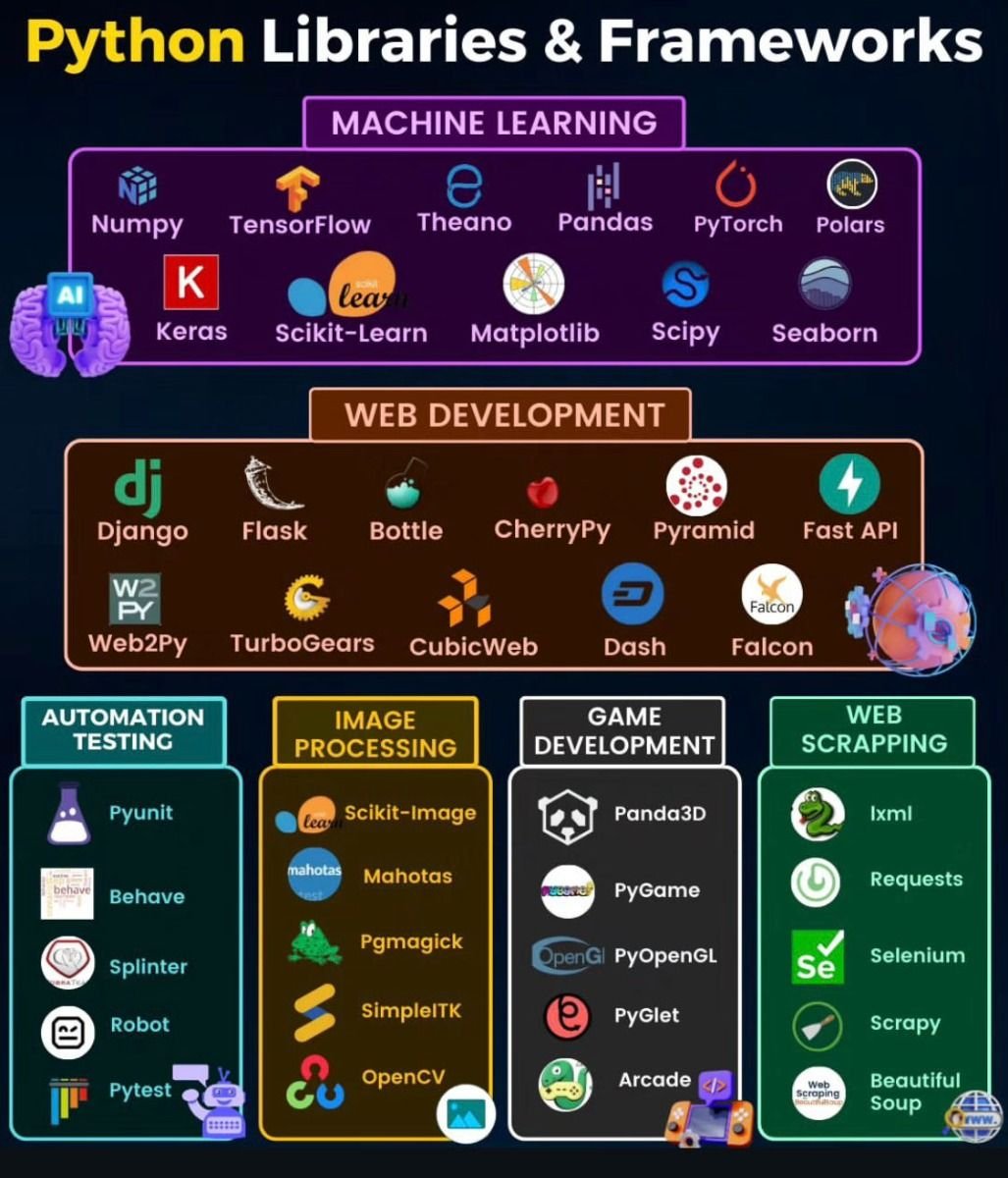
Ever felt like you're reinventing the wheel with every new coding project? From crafting a simple UI component to managing complex database interactions, the sheer volume of code you'd have to write from scratch can be daunting, not to mention error-prone. This isn't just inefficient; it’s a roadblock to innovation. Fortunately, the vast ecosystem of built-in libraries and frameworks offers a powerful solution, allowing you to bypass repetitive tasks and focus your energy on the truly unique aspects of your application. By understanding and effectively leveraging these pre-written code modules, you can drastically accelerate your development process, enhance code quality, and tap into the collective wisdom of thousands of developers worldwide. It’s about building smarter, not just harder, and giving your projects a robust, reliable foundation right from the start.
At a Glance: What You'll Discover
Libraries vs. Frameworks: Demystifying the core difference and "inversion of control."
Why Bother? The undeniable benefits: speed, reliability, standardization, and community support.
Making the Right Choice: Key factors to weigh when picking your tools.
Seamless Integration: Step-by-step guidance on bringing libraries and frameworks into your projects.
Smart Practices & Common Traps: How to avoid common pitfalls and maximize your success.
The Road Ahead: Advanced techniques and emerging trends shaping the future of development.
Your Toolkit: A comprehensive look at leading frontend and backend options.
Libraries vs. Frameworks: Understanding Your Allies
Before diving deep, let's clarify the fundamental building blocks we're discussing. While often used interchangeably, libraries and frameworks serve distinct roles in the development ecosystem. Grasping this distinction is crucial for making informed choices.
Libraries: Your Specialized Toolkits
Think of a library as a collection of ready-to-use code designed to perform specific tasks or a set of related functions. You, the developer, are in control. You decide when and where to call the library's code within your application. It’s like having a specialized toolbox: you pick the exact tool (a function or module) you need for a particular job, use it, and then return to your own code. Examples:
jQuery: Simplifies DOM manipulation and event handling in JavaScript.
Lodash: Provides utility functions for common programming tasks like data manipulation.
React: A library (often mistaken for a framework) primarily for building user interfaces, where you call its components as needed.
Frameworks: The Blueprint and Structure
A framework, on the other hand, is a more comprehensive and opinionated tool. It provides a complete structure for developing applications, including libraries, APIs, and established conventions. With a framework, the control is inverted: the framework calls your code when needed. It’s like a blueprint for a house; it dictates the overall structure, flow, and often even how various components should interact, guiding you through the development process. You build within its established rules and conventions. Examples:
Django (Python): Provides a complete structure for web development, handling routing, database interaction, and more.
Vue.js (JavaScript): Offers a structured approach to building user interfaces, including state management and routing solutions.
Angular (JavaScript/TypeScript): A full-fledged platform for building complex single-page applications.
The Core Difference: Inversion of Control
The critical distinction lies in inversion of control.
With a library, you call the code. Your application dictates the flow, pulling in library functions as needed.
With a framework, the framework calls your code. The framework sets the application's overall flow, invoking your custom logic at specific points in its lifecycle. This difference shapes how you interact with each tool and profoundly impacts your project's architecture and development patterns.
Why Embrace Built-in Libraries & Frameworks? The Developer's Edge
Stepping beyond writing everything from scratch isn't just about saving a few keystrokes; it’s about fundamentally transforming your development efficiency and output quality. The benefits are compelling and multifaceted.
1. Unmatched Efficiency
Imagine having to code a secure user authentication system, robust database queries, or a responsive navigation bar from the ground up for every project. It would consume countless hours. Libraries and frameworks offer pre-built solutions for these common tasks, allowing you to integrate battle-tested functionalities in minutes, not days. This means you can focus your creative energy on the unique challenges of your project, rather than reinventing standard components.
2. Built-in Reliability & Security
Many popular libraries and frameworks are maintained by vast, active communities or large corporations. This means their codebases are rigorously tested, frequently updated, and constantly scrutinized for bugs and security vulnerabilities. Relying on such robust tools significantly reduces the chances of introducing common errors or security flaws into your own applications, offering a level of reliability and security that would be challenging for an individual developer to achieve alone.
3. Promoting Standardization & Best Practices
Frameworks, in particular, impose conventions and structures that encourage consistent coding practices. This is invaluable, especially in team environments. When everyone adheres to the same architectural patterns and naming conventions, code becomes easier to read, understand, and maintain across the team. It flattens the learning curve for new team members and streamlines collaboration, ensuring your project evolves coherently.
4. Robust Community Support & Documentation
When you encounter a problem or need guidance, chances are someone else has faced it before. Popular libraries and frameworks come with extensive documentation, tutorials, and vibrant online communities (forums, Stack Overflow, GitHub discussions). This wealth of resources means you're rarely stuck for long, and help is often just a quick search away. This collective intelligence accelerates problem-solving and fosters continuous learning.
5. Focus on Core Logic
Ultimately, leveraging these tools frees you to concentrate on what makes your application unique—its core business logic. Instead of sweating the small stuff like DOM manipulation, routing, or state management boilerplate, you can channel your efforts into solving the actual problems your application aims to address, delivering value faster and more effectively.
Choosing Your Tools: A Strategic Decision
Selecting the right library or framework is a pivotal decision that can significantly impact your project's trajectory. It’s not just about what's popular, but what genuinely fits your specific needs.
1. Project Requirements & Scope
What are you building? A small, interactive widget might only need a lightweight library like jQuery or a simple component library. A large-scale, enterprise-level application will benefit from a robust framework like Angular, Django, or Spring. Consider the project's complexity, scalability needs, and specific features required (e.g., real-time updates, complex data visualizations, server-side rendering).
2. Learning Curve & Team Expertise
How much time can your team dedicate to learning a new tool? Some frameworks, like Flask, are known for their gentle learning curve, making them ideal for beginners or projects with tight timelines. Others, like Angular, come with a steeper curve dueading to their comprehensive nature and opinionated structure. Match the tool's complexity with your team's existing skill set and available training time.
3. Community & Support Ecosystem
A thriving community means better documentation, more tutorials, regular updates, and quick answers to your questions. Before committing, explore the tool's ecosystem:
How active are its forums and GitHub repositories?
Are there recent updates and maintenance?
Is the documentation comprehensive and easy to understand?
Are there third-party plugins or extensions available?
4. Performance Considerations
While most modern tools are optimized for performance, some might have a larger footprint or different rendering strategies that could impact your application's speed, especially on mobile devices or for users with slower connections. Consider factors like bundle size, rendering efficiency (e.g., virtual DOM vs. direct DOM manipulation), and server-side rendering capabilities. Tools like Next.js or Svelte specifically focus on performance optimizations out-of-the-box.
5. Licensing Terms
Always check the licensing agreements. Most open-source libraries and frameworks use permissive licenses (e.g., MIT, Apache 2.0, GPL) that allow commercial use. However, understanding the specific terms is crucial, especially for proprietary projects or those with specific compliance requirements.
6. Integration with Existing Stack
If your project is part of a larger ecosystem or needs to integrate with existing services, databases, or APIs, consider how well the chosen library or framework plays with these components. Some tools are designed for seamless integration, while others might require custom adapters or workarounds.
Weaving Them In: Steps to Integrate Libraries & Frameworks
Once you've made your choice, integrating these powerful tools into your development workflow is straightforward, usually following a common pattern across different languages and environments.
Step 1: Installation & Setup
Most modern development environments use package managers to handle dependencies.
Manual Download or CDN: For simpler libraries, you might download a .js file directly or link to a Content Delivery Network (CDN) in your HTML. html
Step 2: Import or Include
After installation, you need to make the library or framework accessible within your code.
JavaScript (ES Modules): Use import. javascript import React from 'react'; import { sum } from 'lodash';
Python: Use import. python import django import requests from flask import Flask
HTML: Use <script> tags, often at the end of the <body> for better performance. html
Step 3: Utilize Functions or Classes
With the tool imported, you can now call its provided functionalities.
Library Example (Lodash in JavaScript): javascript import _ from 'lodash'; const numbers = [1, 2, 3, 4]; const total = _.sum(numbers); // Using Lodash's sum function console.log(total); // Output: 10
Library Example (Requests in Python): python import requests response = requests.get('https://api.github.com/events') print(response.json()) # Fetching data using Requests library
Step 4: Adhere to Framework Conventions
When working with a framework, you'll be building within its established structure. This means creating files, classes, and components in specific locations and following particular naming conventions.
Framework Example (React Component): You create a React component by defining a function or class that returns JSX, then render it according to React's lifecycle. jsx // src/components/MyButton.js import React from 'react'; function MyButton() { return ; } export default MyButton; Then, render it in your main application: jsx // src/App.js import React from 'react'; import MyButton from './components/MyButton'; function App() { return (
My React App
);
}
export default App;
* **Framework Example (Django View):** You define views (functions or classes) that receive web requests and return responses, often linking them to URLs in a `urls.py` file.
### Step 5: Customization & Configuration
Most frameworks and many libraries offer configuration options to tailor their behavior to your project's specific needs. This might involve:
* **Configuration Files:** Modifying settings in files like `vue.config.js` for Vue.js, `settings.py` for Django, or `webpack.config.js` for bundlers.
* **Initialization Options:** Passing configuration objects when initializing a library or framework instance.
* **Plugins & Extensions:** Extending functionality through a plugin ecosystem provided by the tool.
## Mastering the Art: Best Practices and Common Pitfalls
Leveraging built-in tools can be immensely powerful, but like any sharp instrument, it requires careful handling. Adhering to best practices and being aware of common mistakes will ensure a smooth, efficient, and secure development journey.
### Best Practices for Success
1. **Keep Dependencies Updated (Regularly):** Outdated libraries and frameworks are prime targets for security vulnerabilities and can lead to compatibility issues. Regularly update your project's dependencies using your package manager (`npm update`, `pip install --upgrade`).
2. **Read the Documentation Thoroughly:** Before jumping in, invest time in understanding the official documentation. It’s your most reliable source for correct usage, best practices, and available features.
3. **Understand Core Concepts:** Don't just copy-paste code. Take the time to grasp *why* a particular library or framework works the way it does, especially concepts like component lifecycles, state management, or routing. A deeper understanding prevents unexpected behavior and facilitates effective debugging.
4. **Test Thoroughly:** While libraries and frameworks are generally reliable, your integration of them might not be. Write unit and integration tests for your code that interacts with these external tools to ensure everything works as expected.
5. **Monitor Performance Impact:** Keep an eye on your application's performance. Large bundles, inefficient component rendering, or excessive API calls can negate the benefits of using these tools. Use browser developer tools and profilers to identify bottlenecks.
6. **Don't Overdo It:** While tempting to pull in a library for every minor task, assess if the complexity and overhead of a new dependency outweigh the benefits for simple functionalities. Sometimes, a few lines of vanilla code are more efficient.
### Common Pitfalls to Sidestep
1. **Over-reliance for Simple Tasks:** Using a heavy library like jQuery just to select a single DOM element is overkill. Sometimes, vanilla JavaScript or native browser APIs are perfectly adequate and result in smaller, faster code.
2. **Version Conflicts (Dependency Hell):** Different libraries in your project might require different versions of a shared dependency, leading to conflicts. Use package managers effectively and be mindful of version ranges (`^`, `~`) to manage these issues. Always prefer exact version pinning for production builds.
3. **Bloated Applications:** Adding too many libraries or large frameworks without optimization can lead to massive bundle sizes, slowing down your application's load time. Employ code splitting, tree shaking, and lazy loading where possible.
4. **Ignoring Third-Party Code Security:** Just because a library is popular doesn't mean it's immune to security flaws. Regularly audit your dependencies for vulnerabilities using tools like `npm audit` or Snyk.
5. **Neglecting License Terms:** Failing to comply with a library's license can lead to legal issues. Always verify the license, especially for commercial projects, to ensure you can use, modify, and distribute the code as intended.
6. **"Framework Lock-in" Illusion:** While frameworks provide structure, you're not entirely "locked in." Many allow custom extensions and integrations. The key is to understand their extension points rather than fighting against their core conventions.
## Beyond the Basics: Advanced Techniques & Future Horizons
Once you're comfortable with the fundamentals, a world of advanced possibilities opens up. The development landscape is constantly evolving, with exciting trends shaping how we build applications.
### Advanced Techniques
* **Creating Your Own Libraries:** As your projects grow, you might find yourself writing reusable code blocks. Packaging these into your own internal library can streamline future development and enforce consistency across projects.
* **Extending Existing Libraries & Frameworks:** Many tools are designed for extensibility. You can write custom plugins for jQuery, middleware for Express, or custom directives for Vue to add project-specific functionalities without modifying the core library.
* **Integrating Multiple Libraries Harmoniously:** Real-world applications often use a combination of tools (e.g., React for UI, Axios for API calls, Redux for state management). Mastering the art of making these different pieces work together seamlessly, understanding their respective roles, is a crucial skill.
* **Server-Side Rendering (SSR) & Static Site Generation (SSG):** For frontend frameworks, techniques like SSR (Next.js, Nuxt.js) and SSG (Gatsby, Hugo) improve initial load times, SEO, and user experience by pre-rendering content on the server or at build time.
### Future Trends Shaping Development
The pace of change in the software world is relentless. Staying aware of emerging trends can help you future-proof your skills and projects.
* **Micro-Frontends:** Breaking down monolithic frontend applications into smaller, independently deployable units, often using different frameworks, to enhance scalability and team autonomy.
* **Serverless Architectures:** Shifting away from managing servers to event-driven functions (e.g., AWS Lambda, Azure Functions) that automatically scale and only consume resources when active, reducing operational overhead.
* **AI/Machine Learning Integration:** Libraries and frameworks increasingly offer built-in support or easy integration for AI and ML models, allowing developers to embed intelligent features without deep expertise in data science.
* **WebAssembly (Wasm):** A low-level binary instruction format for web browsers that enables running high-performance code (written in languages like C++, Rust) directly in the browser, opening doors for computationally intensive web applications and games.
* **Cross-Platform Development:** Frameworks like React Native and Flutter continue to evolve, offering robust solutions for building native mobile applications from a single codebase, blurring the lines between web and mobile development.
## A Tour of Your Toolkit: Leading Libraries & Frameworks
No matter your role—frontend, backend, or full-stack—there's a rich ecosystem of tools designed to make your life easier and your code better. Let's explore some of the most prominent players.
### Who's Building What? Developer Roles
* **Frontend Developers:** Primarily concerned with the user interface (UI) and user experience (UX). They use tools to build what users see and interact with in a browser or mobile app.
* **Backend Developers:** Focus on the server-side logic, database management, APIs, authentication, and communication between the application and the server.
* **Full-stack Developers:** Possess skills in both frontend and backend development, capable of working across the entire application stack.
### Frontend Stars: Crafting Engaging Experiences
These tools are essential for frontend developers to build interactive, responsive, and visually appealing user interfaces.
| Name | Type | Key Features | Best For |
| :----------- | :---------- | :---------------------------------------------------------------------------------------------------------------------------------------------------------------------------------------------------------------------------------------------------------- | :----------------------------------------------------------------------- |
| **Angular** | Framework | Dependency injection, robust developer tools, opinionated structure, built-in routing for Single Page Applications (SPAs), TypeScript-first. | Complex enterprise-level SPAs, highly structured applications. |
| **React** | Library | Component-based architecture using JSX, virtual DOM for performance, highly flexible and composable, vast ecosystem, compatible with various backend technologies. | Dynamic SPAs, interactive UIs, can be paired with other libraries. |
| **Vue.js** | Framework | Progressive adoption, easy learning curve, robust state management (Vuex) and routing (Vue Router) solutions, reactive data binding. | Small to medium-sized SPAs, rapid prototyping, incrementally adopting into existing projects. |
| **Svelte** | Framework | "Compiler" framework (shifts work to compile time), no virtual DOM, minimal runtime code, built-in styling, motion, and state management. | Highly performant web applications, smaller bundle sizes, modern projects. |
| **Next.js** | Framework | Built on React, supports Server-Side Rendering (SSR) & Static Site Generation (SSG), code splitting for fast loading, built-in optimization for Core Web Vitals, API routes for backend. | SEO-friendly React applications, universal apps, e-commerce platforms. |
| **Nuxt.js** | Framework | Built on Vue.js, automatic file-based routing, SSR/SSG support, built-in features like Vuex integration, code splitting. | SEO-friendly Vue applications, content-rich websites, SPAs. |
| **Bootstrap**| CSS Library | Modular architecture, extensive collection of responsive UI components, Sass variables for customization, large community, easy integration. | Rapid prototyping, responsive web design, general-purpose UI. |
| **Tailwind CSS**| CSS Library | Utility-first framework, small bundle size, highly customizable utility classes for rapid prototyping, design system integration. | Custom design systems, highly performant and flexible UIs. |
| **Ember.js** | Framework | Strong data binding, convention over configuration, built-in features for routing, data fetching, and forms, robust CLI. | Ambitious web applications, long-lived projects with predictable needs. |
| **Semantic UI**| CSS Library | Human-friendly HTML, hundreds of pre-built components, 3000+ theming variables, intuitive naming conventions. | Themed web applications, projects valuing clear and semantic code. |
| **Bulma** | CSS Library | Lightweight, flexbox-based CSS framework, easy to learn, responsive components, simple customization of default styles. | Quick responsive layouts, projects needing a modern, clean design. |
### Backend & Full-Stack Powerhouses: Building the Engine
These frameworks provide the robust foundations for server-side logic, API development, and full-stack solutions.
| Name | Type | Key Features | Best For |
| :------------ | :------------- | :-------------------------------------------------------------------------------------------------------------------------------------------------------------------------------------------------------------------------------------------------- | :----------------------------------------------------------------------- |
| **Django** | Backend (Python)| "Batteries-included" framework, ORM, robust admin interface, strong security features, versatile and scalable, often paired with a frontend framework like React or Vue. | Complex data-driven applications, content management systems, APIs. |
| **Flask** | Backend (Python)| Lightweight micro-framework, extensible, highly flexible, beginner-friendly, minimal boilerplate, can be used with various frontend technologies. | Small to medium-sized web applications, APIs, rapid prototyping. |
| **Tornado** | Backend (Python)| Asynchronous web framework, uses a single-threaded event loop for high concurrent connections, ideal for long-polling, WebSockets, and real-time services. | Real-time web services, WebSockets, high-concurrency applications. |
| **Laravel** | Backend (PHP) | Elegant syntax, built-in features for authentication, authorization, database migration, queue management, and content management out-of-the-box. | Modern web applications, APIs, rapidly developing complex projects. |
| **Symfony** | Backend (PHP) | Highly flexible and modular, component-based, robust ecosystem, Twig templating engine, can function as a full-stack framework or an API backend. | Enterprise-level applications, highly custom PHP projects, microservices. |
| **Spring Framework** | Backend (Java)| Comprehensive framework for enterprise Java development, flexible in language (Java, Kotlin, Groovy), follows MVC architecture, extensive module ecosystem (Spring Boot, Spring Data). | Large-scale enterprise applications, microservices, robust APIs. |
| **Ruby on Rails** | Backend (Ruby) | "Convention over configuration" paradigm, emphasizes developer productivity, automatic testing, rich ecosystem of gems, features like generators for rapid development. | Rapid web application development, startups, APIs. |
| **Meteor.js** | Full-stack (JS)| Single codebase for web, mobile, and desktop, real-time data synchronization, zero configuration, integrated build tool. | Real-time applications, rapid full-stack development. |
| **RedwoodJS** | Full-stack (JS)| Full-stack framework built with React, GraphQL, and Prisma, supports Server-Side Rendering (SSR) and Client-Side Rendering, a "cells" concept for data fetching. | Modern JAMstack applications, full-stack SPAs. |
Understanding the strengths and use cases of these popular tools empowers you to pick the right one for your specific challenges, leading to more efficient development and better outcomes. For more insight into combining various components, exploring all possible combinations of technologies can provide a strategic edge in your architectural planning.
## Elevating Your Code, Effortlessly
The journey to becoming a more efficient and effective developer isn't about writing more lines of code; it's about making every line count. Leveraging built-in libraries and frameworks is perhaps the most powerful shortcut to achieving this. By embracing these tools, you're not just borrowing code; you're tapping into years of collective expertise, robust community support, and battle-tested solutions that free you to focus on the truly innovative aspects of your work.
From understanding the nuanced differences between a library and a framework to strategically choosing the right fit for your project, and then seamlessly integrating it with best practices, you're now equipped with the knowledge to supercharge your coding skills. The development landscape is ever-evolving, but with a solid grasp of these fundamental building blocks, you'll be well-prepared to navigate future trends and build sophisticated, reliable applications with confidence. So go ahead, build smarter, faster, and with greater impact.